z_mirror/flib
git clone https://git.raiguard.me/z_mirror/flib
dce0e20
trunk
flib includes several GUI styles for your use and convenience. For help and information on how to use these styles effectively, refer to the work-in-progress GUI style guide.
IMPORTANT: Modifying these styles in any way will modify them for all mods using them. Therefore, unless you are specifically creating a GUI skin mod, DO NOT MODIFY THESE STYLES! Instead, create your own new styles using these styles as parents, then modify those new styles as you wish.
Button styles
flib_selected_frame_action_button
A "selected" frame action button. Use when a frame action button can "toggle" on and off.
flib_selected_tool_button
A "selected" tool button. Use when a tool button can "toggle" on and off.
flib_tool_button_light_green
A light green tool button. Similar to the item_and_count_select_confirm style, but has margin and padding fixes to match other tool buttons.
flib_tool_button_dark_red
A dark red tool button, similar to the red shortcut button style.
Slot styles
flib includes a myriad of colored slot styles for use with sprite-buttons:
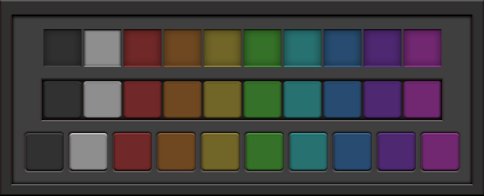
There are three categories of style, from top to bottom: slot, slot_button, and standalone_slot_button. From left to right, the colors are default, grey, red, orange, yellow, green, cyan, blue, purple, and pink.
The styles are formatted as flib_CATEGORY_COLOR. For example, if I want a pink standalone slot button (bottom-right on the preview image), I would use flib_standalone_slot_button_pink.
Each slot style also has a selected variant, which uses the hovered graphics as default. This is intended to let a user "select" a button, and to let the mod visually distinguish it from other buttons around it. To use these styles, replace flib_ with flib_selected_ in the style you wish to use (e.g. flib_selected_slot_button_green).
Empty widget styles
flib_dialog_footer_drag_handle
A drag handle suitable for placement in the footer of a dialog window.
flib_dialog_footer_drag_handle_no_right
A dialog footer drag handle with the right margin removed. Suitable for dialog windows without a confirm button.
flib_dialog_titlebar_drag_handle
A drag handle suitable for placement in the titlebar of a dialog window. Use inside of a flib_titlebar_flow flow.
flib_horizontal_pusher
An invisible element that has horizontally_stretchable set, thereby "pushing" everything to the right.
flib_titlebar_drag_handle
A drag handle suitable for placement in the titlebar of a standard window (a window with a close button, or any other frame action buttons in the titlebar). Use inside of a flib_titlebar_flow flow.
flib_vertical_pusher
An invisible element that has vertically_stretchable set, thereby "pushing" everything to the bottom.
Flow styles
flib_indicator_flow
A flow designed for use with indicators (see below).
flib_titlebar_flow
A flow for use in a custom window titlebar. Identical to a regular horizontal flow, except for an increased horizontal spacing.
Frame styles
flib_shallow_frame_in_shallow_frame
A shallow frame nested in another shallow frame. Use of this is generally recommended against, but can be useful in some specific situations.
Image styles
flib_indicator
A 16x16 image style. Designed for use with flib's indicator sprites (see sprites.md).
Scroll pane styles
flib_naked_scroll_pane
A marginless scroll pane for use inside of content panes. When activated, it draws a shadow around its edges to give a more "inset" effect, to make it more obviously scrollable. The content is given an automatic 12px padding.
flib_naked_scroll_pane_under_tabs
Identical to flib_naked_scroll_pane, but has an inset on the top side when activated. Designed for use inside of a tabbed_pane_with_no_side_padding when not using a toolbar.
flib_naked_scroll_pane_no_padding
Identical to flib_naked_scroll_pane, but has no padding for the content that's put inside. Useful for wrapping a table in a scroll pane, for example.
flib_shallow_scroll_pane
A scroll pane that is inset from a shallow frame, instead of an outer frame.
Tabbed pane styles
flib_tabbed_pane_with_no_padding
A tabbed pane with no padding whatsoever on the content container. Useful for specific situations where you need to have full control of the content padding.
Textfield styles
flib_widthless_textfield
A textfield with no width defined on it. The default textfield style has a width of 200, which can wreak havoc.
flib_widthless_invalid_textfield
A widthless textfield that has a red background. Suitable for situations where the content of the textfield is invalid in some way.
1flib includes several GUI styles for your use and convenience. For help and information on how to use these styles effectively, refer to the [work-in-progress GUI style guide](https://github.com/raiguard/Factorio-SmallMods/wiki/GUI-Style-Guide). 2 3**IMPORTANT:** Modifying these styles in any way will modify them for all mods using them. Therefore, unless you are specifically creating a GUI skin mod, **DO NOT MODIFY THESE STYLES!** Instead, create your own new styles using these styles as parents, then modify those new styles as you wish. 4 5### Button styles 6 7**flib_selected_frame_action_button** 8 9A "selected" frame action button. Use when a frame action button can "toggle" on and off. 10 11**flib_selected_tool_button** 12 13A "selected" tool button. Use when a tool button can "toggle" on and off. 14 15**flib_tool_button_light_green** 16 17A light green tool button. Similar to the `item_and_count_select_confirm` style, but has margin and padding fixes to match other tool buttons. 18 19**flib_tool_button_dark_red** 20 21A dark red tool button, similar to the red shortcut button style. 22 23#### Slot styles 24 25flib includes a myriad of colored slot styles for use with `sprite-button`s: 26 27 28 29There are three categories of style, from top to bottom: `slot`, `slot_button`, and `standalone_slot_button`. From left to right, the colors are `default`, `grey`, `red`, `orange`, `yellow`, `green`, `cyan`, `blue`, `purple`, and `pink`. 30 31The styles are formatted as `flib_CATEGORY_COLOR`. For example, if I want a pink standalone slot button (bottom-right on the preview image), I would use `flib_standalone_slot_button_pink`. 32 33Each slot style also has a `selected` variant, which uses the hovered graphics as default. This is intended to let a user "select" a button, and to let the mod visually distinguish it from other buttons around it. To use these styles, replace `flib_` with `flib_selected_` in the style you wish to use (e.g. `flib_selected_slot_button_green`). 34 35### Empty widget styles 36 37**flib_dialog_footer_drag_handle** 38 39A drag handle suitable for placement in the footer of a **dialog** window. 40 41**flib_dialog_footer_drag_handle_no_right** 42 43A dialog footer drag handle with the right margin removed. Suitable for dialog windows without a `confirm` button. 44 45**flib_dialog_titlebar_drag_handle** 46 47A drag handle suitable for placement in the titlebar of a **dialog** window. Use inside of a `flib_titlebar_flow` flow. 48 49**flib_horizontal_pusher** 50 51An invisible element that has `horizontally_stretchable` set, thereby "pushing" everything to the right. 52 53**flib_titlebar_drag_handle** 54 55A drag handle suitable for placement in the titlebar of a **standard** window (a window with a close button, or any other frame action buttons in the titlebar). Use inside of a `flib_titlebar_flow` flow. 56 57**flib_vertical_pusher** 58 59An invisible element that has `vertically_stretchable` set, thereby "pushing" everything to the bottom. 60 61### Flow styles 62 63**flib_indicator_flow** 64 65A flow designed for use with indicators (see below). 66 67**flib_titlebar_flow** 68 69A flow for use in a custom window titlebar. Identical to a regular horizontal flow, except for an increased horizontal spacing. 70 71### Frame styles 72 73**flib_shallow_frame_in_shallow_frame** 74 75A shallow frame nested in another shallow frame. Use of this is generally recommended against, but can be useful in some specific situations. 76 77### Image styles 78 79**flib_indicator** 80 81A 16x16 image style. Designed for use with flib's indicator sprites (see `sprites.md`). 82 83### Scroll pane styles 84 85**flib_naked_scroll_pane** 86 87A marginless scroll pane for use inside of content panes. When activated, it draws a shadow around its edges to give a more "inset" effect, to make it more obviously scrollable. The content is given an automatic 12px padding. 88 89**flib_naked_scroll_pane_under_tabs** 90 91Identical to `flib_naked_scroll_pane`, but has an inset on the top side when activated. Designed for use inside of a `tabbed_pane_with_no_side_padding` when not using a toolbar. 92 93**flib_naked_scroll_pane_no_padding** 94 95Identical to `flib_naked_scroll_pane`, but has no padding for the content that's put inside. Useful for wrapping a table in a scroll pane, for example. 96 97**flib_shallow_scroll_pane** 98 99A scroll pane that is inset from a shallow frame, instead of an outer frame. 100 101### Tabbed pane styles 102 103**flib_tabbed_pane_with_no_padding** 104 105A tabbed pane with no padding whatsoever on the content container. Useful for specific situations where you need to have full control of the content padding. 106 107### Textfield styles 108 109**flib_widthless_textfield** 110 111A textfield with no width defined on it. The default textfield style has a width of 200, which can wreak havoc. 112 113**flib_widthless_invalid_textfield** 114 115A widthless textfield that has a red background. Suitable for situations where the content of the textfield is invalid in some way.